Recall Bench
Recall Bench is a benchmark harness for evaluating agent memory systems. It measures how well a memory system can ingest, organize, and retrieve information over long time horizons — up to 1,000 days of synthetic daily logs per persona.
Table of contents
Why Recall Bench?
Most memory system evaluations test retrieval over small corpora or short time spans. Real-world agents accumulate months or years of context. Recall Bench fills that gap by simulating realistic, long-horizon memory workloads across diverse professional domains and measuring performance degradation as the corpus grows.
How It Works
Recall Bench follows a three-phase evaluation loop:
┌──────────────────────────────────────────────────────────────────┐
│                     Benchmark Lifecycle                          │
│                                                                  │
│  For each (persona × time-range):                                │
│                                                                  │
│    1. SETUP        → adapter.setup()                             │
│    2. INGEST       → adapter.ingestDay(1..N)  [chronological]    │
│    3. FINALIZE     → adapter.finalizeIngestion()                 │
│    4. QUERY        → adapter.query(question)  [for each Q&A]    │
│    5. SCORE        → judge.score(question, ref, answer)          │
│    6. TEARDOWN     → adapter.teardown()                          │
│                                                                  │
│  Each time-range gets a FRESH lifecycle — no state leaks.        │
└──────────────────────────────────────────────────────────────────┘
Phase 1 — Ingestion. Daily memory logs (markdown) are fed to the system under test in chronological order. The system can index, embed, summarize, or store them however it likes.
Phase 2 — Querying. The harness poses natural-language questions grounded in specific days. Questions are filtered per time-range so the system is only asked about information it has actually seen.
Phase 3 — Scoring. A judge model compares each answer against a reference answer, scores it along the three judged dimensions, and tags it with one of the recall categories described in the next section.
Scoring & Recall Categories
Every answer is scored on three judged dimensions, which split into two independent axes: recall quality (was the answer right and complete?) and hallucination (was it grounded in real memories at all?). Each question is also tagged with exactly one recall category describing what kind of memory work it demands.
                ┌─────────────────────────────────────┐
                │   Recall quality (per Q&A)          │
                │   correctness (0–3)                 │
                │ + completeness (0–2)                │
                │ → composite recall score (0–5)      │
                └─────────────────────────────────────┘
                                  +
                ┌─────────────────────────────────────┐
                │   Hallucination (independent)       │
                │   hallucination (0–1)               │
                │   1 = grounded, 0 = fabricated      │
                └─────────────────────────────────────┘

  Composite score per Q&A = correctness + completeness + hallucination → max 6.0
Hallucination is scored on every question, regardless of category. Holding it apart from the recall score lets you read each in isolation — a system can be confidently wrong (high recall score, low hallucination score) or accurately silent (low recall score, high hallucination score). Mixing them into one number hides which failure mode dominates.
The recall categories
Each question is tagged with exactly one category. The harness reports per-category scores so you can see which kind of memory work degrades first as the corpus grows. There are eight core categories (always evaluated) plus two group-aware categories that require multi-session personas and are enabled with --groups-enabled.
Core categories (8):
| Category | What It Measures | Example Question |
|---|---|---|
factual-recall |
Retrieving a specific fact stated on a specific day. Tests basic storage and retrieval fidelity — can the system find a needle in 1,000 days of hay? | “What database engine did the team choose for the analytics service on day 247?” |
temporal-reasoning |
Understanding when things happened and in what order. Requires the system to maintain or reconstruct chronological relationships between events. | “Did the load balancer migration finish before or after the Q3 security audit?” |
decision-tracking |
Following a decision through its full lifecycle — proposal, discussion, objections, and final resolution. Tests whether the system preserves deliberation context, not just outcomes. | “Why was Redis chosen over Memcached for the session store, and who raised the initial objection?” |
contradiction-resolution |
Handling information that was later corrected or superseded. The system must recognize that an earlier belief was updated and return the latest correct version. | “What is the current max connection pool size? (It was changed from the original setting on day 312.)” |
cross-reference |
Connecting information that spans multiple unrelated arcs or time periods. Tests the system’s ability to synthesize across memory boundaries that were never explicitly linked. | “Which two projects both experienced deployment failures caused by the same misconfigured environment variable?” |
recency-bias-resistance |
Recalling old information that hasn’t been mentioned recently with the same fidelity as recent events. Exposes systems that implicitly down-weight older memories. | “What was the root cause of the day-45 outage?” (asked at day 900, with no intervening references) |
synthesis |
Combining information from multiple separate memories into an answer that doesn’t exist in any single entry. Requires aggregation, comparison, or pattern recognition across days. | “How did the team’s approach to database migrations evolve over the first year?” |
negative-recall |
Correctly identifying that something was not mentioned or did not happen. Tests whether the system fabricates plausible-sounding answers when the truthful response is “no evidence found.” | “Did the team ever discuss migrating to GraphQL?” (when they didn’t) |
Group-aware categories (2, opt-in via --groups-enabled):
These exercise personas whose days are split across multiple sessions (e.g. a principal plus separate, isolated conversation threads), testing whether the system attributes statements correctly and respects information boundaries between sessions.
| Category | What It Measures | Example Question |
|---|---|---|
group-session-attribution |
Attributing a statement to the right participant in a multi-party session — who said or decided what. | “In the Q3 planning session, who pushed back on the hiring freeze?” |
information-boundary |
Refusing to leak content from a session the query has no access to. Each pair carries a querySession, the forbiddenSessions whose content must not be echoed, and an expectedDisclosure of refuse, partial, or answer. |
“What did the CEO discuss in the board-only session?” (asked from a session that shouldn’t see it → expected: refuse) |
For information-boundary pairs the judge uses a boundary-aware prompt and scores against the expected disclosure behavior — a clean refusal is the correct answer, not a recall failure.
Hallucination
Hallucination is a binary judgement on every answer: was anything in this answer not supported by memories the system actually has?
| Score | Meaning |
|---|---|
1 |
Fully grounded — every claim traces to an ingested memory (or correctly admits no evidence) |
0 |
Hallucinated — at least one claim was fabricated, embellished, or transplanted from outside the corpus |
Two design choices matter here:
- Hallucination is independent of correctness. A system can hallucinate while still being correct (lucky guess) or be wrong without hallucinating (it retrieved the wrong real memory). The judge prompt is structured to score these separately so neither masks the other.
negative-recallis the canary. When the truthful answer is “no evidence found,” any plausible-sounding answer is by definition a hallucination. This category is the cleanest direct test of the hallucination dimension; the other categories test it indirectly.
The aggregate hallucination rate for a run is the percentage of questions scored 0 on this dimension. It is reported separately from the recall composite — you’ll see it as a dedicated row beneath the heatmap, not as one of the per-category rows.
Tracking Hallucinations Over Time
Hallucination tends to increase with corpus size — the more memories a system has, the more raw material it has to confuse, conflate, or invent from. Recall Bench surfaces this trajectory through several views, and you should track all of them across runs to spot regressions early:
1. The hallucination row in the heatmap. Every evaluation point reports its hallucination rate as a single percentage. Reading left-to-right shows the trajectory as the corpus grows. A flat line near 0% is the goal; a steady rise from 1% → 10% across the 1,000-day axis means the system increasingly fills gaps with fabrication.
2. Per-category hallucination. Aggregate rate hides where the fabrication is concentrated. Break it out: negative-recall and synthesis are the highest-risk categories, and their hallucination rates often diverge from the rest. A system can have a healthy 2% overall rate but a 40% rate inside negative-recall — the aggregate masks a clear failure mode.
3. Trend slope, not just absolute rate. Two systems both ending at 8% hallucination tell different stories if one started at 2% (steady degradation) and the other at 7% (always bad, didn’t get worse). When comparing runs, fit a simple linear regression of hallucination rate against corpus size and report both intercept and slope. The slope is the more interesting number — it predicts how the system will behave at 2,000 or 5,000 days.
4. Question-level reproducibility across runs. Some questions reliably trigger hallucination across seeds, models, and corpus sizes. Tag these as canary questions and watch them on every run — when one stops hallucinating, you’ve made real progress; when a previously-clean question starts hallucinating, you’ve regressed. The harness’s --json output includes per-question scores so this can be diffed automatically.
5. Hallucination versus recall correlation. Plot recall composite (x-axis) against hallucination rate (y-axis) per evaluation point. A healthy system shows hallucination rising as recall falls — the system is honestly admitting uncertainty when memories are gone. A pathological system shows hallucination also falling as recall falls — meaning the system is confidently fabricating answers it doesn’t actually have, and the judge is sometimes scoring those fabrications as correct. The second pattern is far more dangerous and the only way to catch it is by tracking these two metrics jointly.
6. Per-persona splits. Different domains exercise different fabrication tendencies — a system trained heavily on tech vocabulary may invent plausible-sounding legal precedents but balk at fabricating medical diagnoses (or vice versa). Always report hallucination broken out by persona, not just aggregated, so domain-specific weaknesses don’t get averaged away.
Evaluation Checkpoints
Performance is measured at a set of checkpoints across the corpus to reveal how the system degrades as memory grows. You choose the checkpoints with --ranges: each entry is a day count or a named alias (30d, 90d, 6mo, 1y, full), and passing several builds a multi-column heatmap (e.g. --ranges 6d,12d,18d,24d).
The spacing is a resolution/cost tradeoff — a finer sweep exposes degradation patterns more precisely but multiplies the work, since each checkpoint gets a completely fresh adapter lifecycle (setup → ingest → finalize → query → teardown):
| Checkpoint spacing | Checkpoints (1000d) | Best for |
|---|---|---|
| every 7 days | ~143 | Fine-grained heatmaps |
| every 14 days | ~72 | Standard benchmark runs |
| every 30 days | ~34 | Faster iteration |
| named ranges only | 5 | Quick smoke tests |
At each checkpoint, Q&A pairs are filtered so only questions whose relevant_days all fall within the cutoff day are included. Use --sample <n> to cap how many historical questions are re-asked per checkpoint (newly-eligible questions are always evaluated); this keeps a fine-grained sweep affordable.
The separate
--intervalflag belongs togenerate-qa(default 7 days) and controls how densely Q&A pairs are authored across the corpus — not how theruncommand evaluates them.
The Persona System
Recall Bench uses personas — synthetic identities with realistic professional backgrounds spanning 1,000 days of activity. Each persona has:
- Identity (
persona.yaml) — name, role, domain, company, communication style - Story arcs (
arcs-1000d.yaml) — overlapping narrative threads (projects, incidents, decisions, learning, relationships, corrections) that drive what happens each day - Daily logs (
memories/day-NNNN.md) — 1,000 markdown files, one per day - Q&A pairs (
qa/questions.yaml) — evaluation questions with reference answers, categories, difficulty levels, and relevant day numbers
Shipped Personas
The benchmark ships with 6 cross-domain personas to ensure the evaluation isn’t biased toward any single profession:
| Persona | Role | Domain |
|---|---|---|
backend-eng-saas |
Senior Backend Engineer | B2B SaaS platform |
er-physician |
Emergency Physician | Urban trauma center |
litigation-attorney |
Litigation Attorney | Mid-size law firm |
research-scientist |
Research Scientist | University biology lab |
financial-advisor |
Financial Advisor | Wealth management firm |
executive-assistant |
Executive Assistant to a CFO | Corporate finance |
executive-assistant ships both a full arcs-1000d.yaml and a shorter arcs-180d.yaml, and is the primary test bed for the group-aware categories — its days are split across multiple sessions, which is what information-boundary and group-session-attribution probe. Select an arcs variant for any generation or run command with --arcs <filename>.
Story Arcs
Arcs create realistic complexity:
- 4 max concurrent arcs at any time — avoids overwhelming any single day
- Arc types: projects (long-running), incidents (short bursts), decisions (medium-length deliberation), learning (skill acquisition), relationships (interpersonal threads), corrections (belief revisions)
- Correction arcs are especially important — they test whether the system can track that a previously held belief was later corrected
- Quiet periods (vacations, breaks) are intentionally included to test behavior with temporal gaps
Dataset Generation Pipeline
Datasets are generated by a three-pass LLM pipeline, with Q&A pairs authored on top:
┌─────────────────────────────────────────────────────────────────┐
│  Step 1: create-persona                                         │
│  Prompt → persona.yaml + arcs-Nd.yaml                           │
├─────────────────────────────────────────────────────────────────┤
│  Step 2: generate  (Pass 1)                                     │
│  Process arcs in order → generate day-by-day logs               │
│  • Arc-driven: each arc selects its active days                 │
│  • Per-session: each active session renders under its own       │
│    `# session: <id>` heading on the day                         │
│  • Context: sliding window of recent days + arc summaries       │
│  • Density hints: quiet / normal / busy / dense                 │
├─────────────────────────────────────────────────────────────────┤
│  Step 2b: Gap filling                                           │
│  Fill weeks with < 5 active days with routine filler            │
├─────────────────────────────────────────────────────────────────┤
│  Step 3: generate-conversations  (Pass 2, optional)             │
│  Convert daily logs → user/assistant conversation turns         │
├─────────────────────────────────────────────────────────────────┤
│  Step 4: generate-tool-calls  (Pass 3, optional)               │
│  Convert daily logs → memory-save tool-call traces (YAML)       │
│  for systems benchmarked through an agent tool loop             │
├─────────────────────────────────────────────────────────────────┤
│  Step 5: generate-qa  (standard | boundary mode)               │
│  Walk the corpus in checkpoints → questions.yaml with           │
│  reference answers, categories, difficulty, relevant_days       │
└─────────────────────────────────────────────────────────────────┘
Pass 1 separates “what happened” from how it was communicated. Pass 2 optionally reconstructs the conversations that would have produced those logs. Pass 3 optionally emits the tool-call trace an agent would have made to save those memories — used when a system under test is driven through a tool loop rather than fed raw markdown.
Q&A generation (generate-qa) walks the corpus in checkpoint windows (default every 7 days), generating pairs grounded only in days at or before each checkpoint so a question never depends on information the system hasn’t seen yet. Its --mode boundary variant authors information-boundary probes for multi-session personas instead of standard recall questions.
Creating a Cast
Generating a 1,000-day persona is a long, expensive operation — at typical CLI-agent latencies, a full run takes hours and burns through hundreds of subprocess invocations. Recall Bench’s generation pipeline is designed around the assumption that something will go wrong mid-run (network blip, agent crash, watchdog timeout, the user hitting Ctrl-C) and that the run must be cheap to recover from.
Incremental, durable progress
recall-bench generate writes each day to disk as soon as it is produced, not at the end of the run. A 1,000-day run that crashes at day 437 leaves you with 436 days on disk; resuming with --start 437 picks up where you left off. The progress indicator reflects this:
Generated day 437/1000 (437 unique)
The “(N unique)” counter shows how many distinct days have actually landed on disk, which can differ from the day number when arcs overlap (the same day can be touched by Pass 1 and again by gap-fill).
Per-day failure resilience
A single failed subprocess call (timeout, agent crash, malformed output) no longer aborts the run. The failure is logged to stderr and the generator moves on:
[generator] arc=incident-q3-outage day=237 skipped: Agent timed out after 600000ms
When the run finishes, the result reports only the days that succeeded. To fill the gaps left by skipped days, re-run generate with --start <skipped-day> --end <skipped-day> for each one, or run a wider range and existing files will be overwritten with fresh content.
Coding-agent quirks
The built-in CLI agents (claude, codex, copilot) do not accept --temperature or --max-tokens flags. The pipeline detects these well-known agents and silently strips those flags before invocation; the values you pass to recall-bench generate --temperature 0.7 are honored only when the underlying model is a custom command or a JS module. If you need finer control over coding-agent generation parameters, configure them through the agent’s own configuration file rather than through the bench CLI.
Subprocess termination on Windows
The default --timeout for generate is 600 seconds (10 minutes) per day. When a subprocess exceeds the timeout, the harness uses an explicit watchdog and force-kills the process tree:
- Windows:
taskkill /T /F /PID <pid>— terminates the cmd.exe wrapper and the agent subprocess it spawned. Necessary because Node’s built-inspawntimeout sends SIGTERM, whichcmd.exedoes not propagate to children. - POSIX:
SIGKILLto the process group.
This matters in practice: without tree-kill on Windows, a hung claude.cmd subprocess can leak file handles and sit consuming a token bucket indefinitely while the parent thinks it’s been cleaned up.
End-to-end example
# Step 1 — create the persona
npx recall-bench create-persona \
  --prompt "A research scientist studying protein folding at a university lab" \
  --model claude \
  --persona ./dataset/scientist

# Step 2 — generate 1,000 days (resume-safe, failures are skipped)
npx recall-bench generate \
  --persona ./dataset/scientist \
  --model claude

# If days 237 and 612 were skipped due to subprocess failures,
# re-run just those:
npx recall-bench generate \
  --persona ./dataset/scientist \
  --model claude \
  --start 237 --end 237

npx recall-bench generate \
  --persona ./dataset/scientist \
  --model claude \
  --start 612 --end 612
Optional: Conversation History Generation
Pass 2 (generate-conversations) converts daily memory logs into multi-turn user/assistant conversations — the kind of dialogue that would have produced each day’s log. This is useful for memory systems that ingest conversation transcripts rather than structured logs.
Each generated conversation contains 4–12 turns, written in the persona’s natural voice and communication style. The conversations are consistent with the daily log but feel like organic dialogue, not forced extraction — some log entries are the persona’s own observations that don’t appear in the conversation.
You can generate conversations for the full 1,000-day corpus or a subset using --start and --end flags. For example, generating 100 days of conversation history is a good way to test a system’s conversation ingestion without the cost of processing all 1,000 days:
# Generate conversations for days 1–100 only
npx recall-bench generate-conversations \
  --persona ./dataset/my-persona \
  --model claude \
  --start 1 --end 100

# Generate for the full corpus
npx recall-bench generate-conversations \
  --persona ./dataset/my-persona \
  --model claude
The generate-conversations command reads daily logs from <persona-dir>/memories/ and writes conversation files to <persona-dir>/conversations/. Output is written as one file per day (conv-0001.md or conv-0001.json) in either markdown or JSON format (--format markdown|json). Since each day’s conversation depends only on its daily log, generation is fully parallel across days.
Connecting Your Memory System
Any system that can ingest markdown and answer questions can participate. Two integration paths:
TypeScript Adapter
import type { MemorySystemAdapter, DayMetadata } from '@recall/bench';

const adapter: MemorySystemAdapter = {
  name: 'My Memory System',
  async setup() { /* clean state */ },
  async ingestDay(day: number, content: string, metadata: DayMetadata) { /* store */ },
  async finalizeIngestion() { /* build indexes */ },
  async query(question: string): Promise<string> { return answer; },
  async teardown() { /* cleanup */ },
};
export default adapter;
gRPC Adapter (any language)
Implement the MemoryBenchService proto and point the harness at it:
npx recall-bench run --adapter grpc://127.0.0.1:50052 --data ./personas
The gRPC interface maps 1:1 to the TypeScript adapter. This lets you write adapters in Python, Go, Rust, Java, C#, or anything with gRPC support.
Output: The Heatmap
The primary output is a category × time-range heatmap showing mean composite scores. This is the key artifact for understanding a memory system’s strengths and weaknesses.
Example Heatmap Output
═══════════════════════════════════════════════════════════════════════════════
  AGGREGATE HEATMAP — Recall System (6 personas, 7-day checkpoints)
═══════════════════════════════════════════════════════════════════════════════
                             7d   14d   21d   28d  ...   980d  987d  994d 1000d
───────────────────────────────────────────────────────────────────────────────
  factual-recall            5.5   5.5   5.4   5.4  ...   3.9   3.8   3.8   3.8
  temporal-reasoning        4.7   4.7   4.7   4.6  ...   3.0   2.9   2.9   2.9
  decision-tracking         5.3   5.3   5.2   5.2  ...   3.8   3.7   3.7   3.7
  contradiction-resolution   --    --    --    --   ...   2.5   2.4   2.4   2.4
  cross-reference           4.9   4.8   4.8   4.7  ...   3.2   3.1   3.1   3.1
  recency-bias-resistance   5.1   5.1   5.0   5.0  ...   2.7   2.7   2.6   2.6
  synthesis                 4.3   4.3   4.2   4.2  ...   2.8   2.7   2.7   2.7
  negative-recall           5.6   5.6   5.5   5.5  ...   4.1   4.1   4.1   4.1
───────────────────────────────────────────────────────────────────────────────
  OVERALL                   5.06  5.04  5.01  4.99 ...   3.25  3.19  3.17  3.16
═══════════════════════════════════════════════════════════════════════════════
  Hallucination rate:       1.0%  1.1%  1.1%  1.2% ...   9.7%  9.9% 10.1% 10.3%
═══════════════════════════════════════════════════════════════════════════════

  143 evaluation points (... indicates ~135 omitted columns)
Reading the Heatmap
Columns represent evaluation points at each interval. Reading left to right shows how performance degrades as the corpus grows. A system with good long-term recall will show a gentle color transition; a system that relies heavily on recency will show a sharp green-to-red shift.
Rows represent evaluation categories — the eight core categories above, plus the two group-aware categories (group-session-attribution, information-boundary) as additional rows when the run uses --groups-enabled. Each cell’s color reflects the mean composite score (0.0–6.0) across all personas and eligible questions for that category at that evaluation point. Green = strong performance, amber = moderate, red = poor.
Key patterns to look for:
- Sharp color transition in
recency-bias-resistance→ system over-weights recent memories - Gray cells in
contradiction-resolutionat early periods → correction arcs haven’t started yet (by design — corrections take time to develop) - Consistently warm colors across
synthesis→ system struggles to combine information from multiple memories - Persistent green in
negative-recall→ system correctly avoids fabricating answers - Hallucination rate shifting to warm colors → system fills gaps with fabricated content as the corpus grows
Visual Heatmap (Color-Coded)
When rendered visually, the heatmap uses a green → amber → red color scale to make performance patterns immediately obvious:
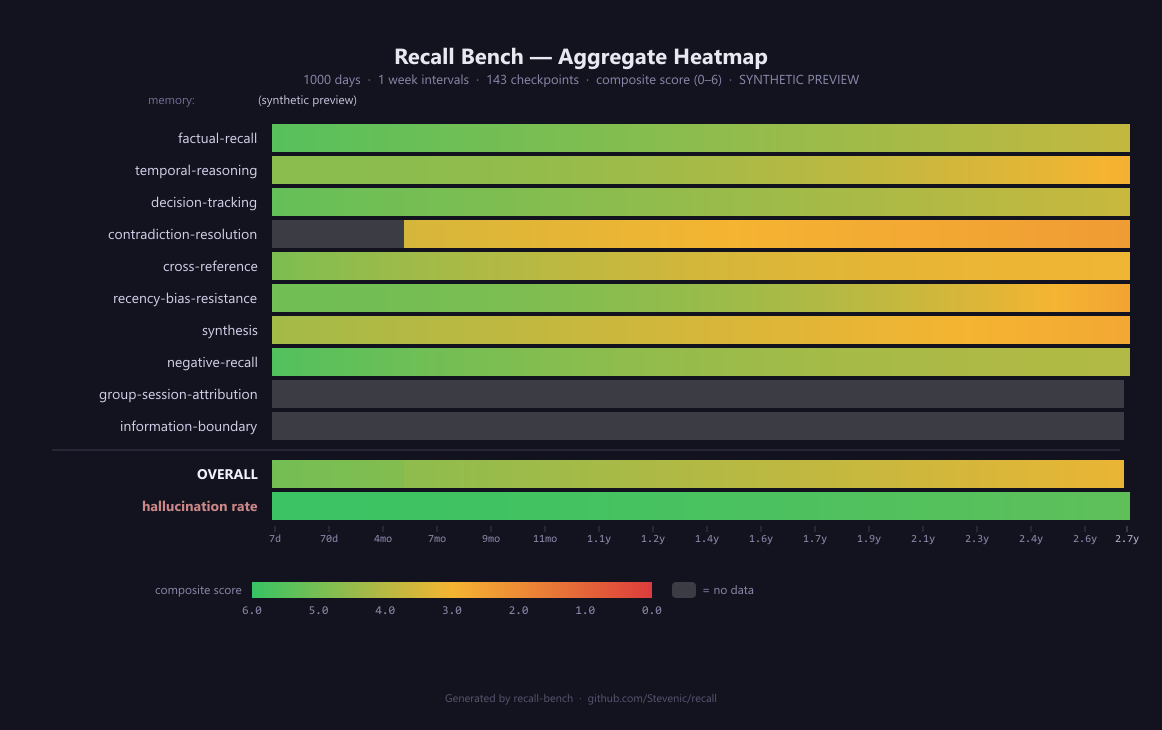
The characteristic “cooling gradient” from left to right is expected — all memory systems degrade with scale. What matters is how steep the gradient is and which categories degrade fastest. Gray cells (--) indicate insufficient data at that time range.
Regenerate the image:
node scripts/generate-heatmap.mjs [--interval 7] [--days 1000] [--output path.png](requirescanvasdev dependency).
CLI Reference
Running a Benchmark
npx recall-bench run \
  --adapter grpc://127.0.0.1:50052 \
  --data ./personas \
  --judge anthropic:claude-opus-4-8 \
  --personas backend-eng-saas er-physician \
  --ranges 30d,90d,full \
  --json-out bench-results/drafts/my-run/result.json
Adapter & data
| Flag | Default | Description |
|---|---|---|
--adapter <url\|path> |
required | gRPC URL (grpc://host:port) or path to a JS adapter module |
--data <dir> |
required | Dataset directory containing persona folders |
--profile <path> |
— | YAML profile supplying adapter/data/models/run settings; explicit flags override it |
Judging
| Flag | Default | Description |
|---|---|---|
--judge <spec> |
stub (zeros) | CLI agent name, model spec (openai:…, anthropic:…, azure:…), or JS module path |
--appellate-judge <spec> |
— | Optional second judge invoked only on primary-judge failures; its verdict is final and both scores are recorded |
--judge-memory-window <n> |
0 | Days of memory context around the relevant day the judge sees (0 = reference-only) |
Selection
| Flag | Default | Description |
|---|---|---|
--personas <ids...> |
all | Subset of personas to run |
--ranges <ranges...> |
named ranges | Checkpoints: day counts or aliases (30d, 90d, 6mo, 1y, full) |
--arcs <filename> |
arcs-1000d.yaml |
Arcs file inside each persona dir (pairs the memories/qa dirs); use arcs-180d.yaml for the 180-day variant |
--sample <n> |
full | Per-checkpoint cap on re-asked historical questions |
--groups-enabled |
off | Enable the group-aware categories (group-session-attribution, information-boundary) |
--seed <n> |
42 | Shuffle seed (0 = no shuffle) |
Execution
| Flag | Default | Description |
|---|---|---|
--parallelism <n> |
1 | Max concurrent queries |
--timeout <ms> |
30000 | Per-question timeout |
--grpc-timeout <ms> |
120000 | Per-RPC timeout (gRPC adapter) |
--dry-run |
off | Stop after the first checkpoint — catches config errors fast |
--skip-preflight |
off | Skip startup validation of profile / persona files / Q&A loads |
Output & resume
| Flag | Default | Description |
|---|---|---|
--json / --heatmap |
text | Emit full JSON / heatmap grid only |
--json-out <path> |
— | Write the full BenchmarkResult; siblings heatmap.png, progress.jsonl, questions.jsonl, failures.jsonl are written alongside it |
--no-heatmap-png |
off | Skip the automatic PNG render that accompanies --json-out |
--question-log <path> |
questions.jsonl |
One JSONL record per evaluated question (Q, ref, answer, score, retrieval, latency); --no-question-log disables |
--progress-jsonl <path> |
progress.jsonl |
Stream per-checkpoint progress as JSON lines |
--resume <path> |
— | Resume an interrupted run from a prior progress.jsonl; --skip-catchup-ingest avoids re-ingesting when the adapter preserves state |
Generating Datasets
# Step 1: Create persona + arcs
npx recall-bench create-persona \
  --prompt "A backend engineer at a B2B SaaS company" \
  --model claude --persona ./dataset/my-persona

# Step 2: Generate 1,000 days (Pass 1)
npx recall-bench generate \
  --persona ./dataset/my-persona --model claude

# Step 3: (Optional) Conversation transcripts (Pass 2)
npx recall-bench generate-conversations \
  --persona ./dataset/my-persona --model claude --format markdown

# Step 4: (Optional) Tool-call traces for agent-loop systems (Pass 3)
npx recall-bench generate-tool-calls \
  --persona ./dataset/my-persona --model claude

# Step 5: Author Q&A pairs across the corpus
npx recall-bench generate-qa \
  --persona ./dataset/my-persona --model claude
# ...and boundary probes for multi-session personas:
npx recall-bench generate-qa \
  --persona ./dataset/my-persona --model claude --mode boundary
Utility Commands
# List available personas
npx recall-bench list --data ./personas

# Show time-range definitions
npx recall-bench ranges
Architecture
┌───────────────────────────────────────────────────────────────┐
│                       recall-bench                            │
├───────────────┬──────────────────┬────────────────────────────┤
│   CLI Layer   │  Harness Engine  │   Generation Pipeline      │
│  (commander)  │  (orchestration) │  (LLM-driven)              │
├───────────────┼──────────────────┼────────────────────────────┤
│ cli.ts        │ harness.ts       │ persona-creator.ts         │
│               │ types.ts         │ generator.ts               │
│               │ report.ts        │ conversation-generator.ts  │
│               │ dataset.ts       │ tool-call-generator.ts     │
│               │ llm-judge.ts     │ qa-generator.ts            │
├───────────────┴──────────────────┴────────────────────────────┤
│                     Adapter Layer                             │
│  ┌─────────────────────┐    ┌──────────────────────────────┐  │
│  │  JS Module Adapter  │    │  gRPC Adapter (any language)  │ │
│  │  (direct import)    │    │  (proto/memory_bench_service) │ │
│  └─────────────────────┘    └──────────────────────────────┘  │
└───────────────────────────────────────────────────────────────┘
Programmatic API
All functionality is available as a library:
import {
  BenchmarkHarness,
  formatTextReport,
  formatJsonReport,
  toHeatmapGrid,
  loadPersona,
  filterQAByRange,
  listPersonas,
  DayGenerator,
  PersonaCreator,
  GrpcMemoryAdapter,
} from '@recall/bench';